Designing a brandable smart shade app for multi-brand IoT control
A leading window coverings distributor needed a single mobile app that could be white-labeled for multiple brands, controlling motorized blinds via Bluetooth without violating App Store policies.
From proof-of-concept to product-ready blueprint
Turnils, a subsidiary of Hunter Douglas and a leading distributor of components for custom window coverings, had developed a proof-of-concept mobile app for controlling motorized blinds and shades. The app worked for testing purposes, but it was built with legacy technology, was difficult to use, and could not scale to support the company's multi-brand business model.
Turnils engaged Digital Scientists to deliver a comprehensive MVP Product Blueprint that would define the user experience, technical architecture, and development roadmap for a production-quality smart shade mobile application. The engagement required close collaboration with international hardware teams developing Bluetooth motors and RF bridges simultaneously.
The resulting blueprint covered everything from user personas and competitive analysis to a full React Native solution architecture and a phased build roadmap, providing Turnils with a clear, actionable path from concept to launched product.

One app, many brands, evolving hardware
Turnils faced a unique set of challenges that made this engagement far more complex than a typical mobile app project. As a shade wholesaler, they needed a single application that could serve multiple brand identities, while the underlying hardware was still being developed by teams across the globe.
Legacy Proof-of-Concept
The existing mobile app was built for internal testing with outdated technology. It was difficult to use, lacked polish, and could not serve as the foundation for a consumer product.
White-Label Constraints
Turnils needed one app that could be branded for each customer they serviced, such as Smith and Noble, without creating multiple identical apps that would violate App Store white-label policies.
Hardware in Development
The Bluetooth motors and RF bridges that the app would control were under active development. The software design had to account for hardware capabilities that were still being finalized.
International Collaboration
Hardware teams were distributed across different countries and time zones, requiring careful coordination to align software requirements with firmware capabilities and physical motor specifications.
Complex Device Matrix
The app needed to work with all 6 motor types across over 30 products, communicating via both RF and Bluetooth protocols, each with different motion capabilities and control characteristics.
Multi-Language Support
The app required Spanish and English translation support from day one, with an architecture that could accommodate additional languages as Turnils expanded into new markets.
Defining what to build and for whom
Digital Scientists led a comprehensive discovery phase that included stakeholder workshops, persona development, journey mapping, and a MoSCoW prioritization exercise to define the MVP scope. This research established the foundation for every design and architecture decision that followed.
Design Criteria Canvas
A MoSCoW prioritization workshop produced a Design Criteria Canvas that classified every feature requirement into Must, Should, Could, and Won't categories. This exercise aligned stakeholders on MVP scope and deferred items like voice assistant integration, BLE communication, and multi-tenant support to future releases.
Must-have features
Should-have features
Could-have features
Deferred to future

Design Criteria Canvas: MoSCoW prioritization from stakeholder workshop
User Personas
Three distinct personas were developed to represent the full range of users who would interact with the app, from tech-savvy DIY consumers to professional installers configuring systems for clients.
The DIY Installer
Tech-savvy, age ~27
A young, technically confident homeowner who purchases smart shades and installs them without professional help. Expects a seamless app experience similar to other smart home devices and wants quick setup with minimal friction.
The Professional Installer
Full service, age ~35
A professional window treatment installer who configures smart shade systems for clients. Needs to quickly pair multiple devices, set up rooms and scenes, and hand off a working system to a homeowner who may be less technically inclined.
The Everyday Consumer
Less tech-savvy, age ~50
An average homeowner who is less comfortable with technology. Wants the shades to "just work" with minimal setup complexity. Needs clear guidance through onboarding and values simplicity over customization options.
Journey Mapping
Digital Scientists mapped the complete user journey for both end users (self-installers) and professional installers, identifying key touchpoints, decision moments, and pain points across the entire shade ownership lifecycle, from initial purchase through daily use.
A separate track mapped the brand partner experience (such as Smith and Noble), identifying where the white-label customization points needed to integrate seamlessly into the onboarding flow.

User journey map across end user and professional installer paths
Learning from the best in smart home and IoT
Digital Scientists conducted a comprehensive competitive analysis of leading smart blind applications and general IoT home automation apps. The review identified four key design themes that consistently distinguished the best experiences in the market.
Easy Onboarding
The best IoT apps make device setup effortless with step-by-step guided flows, automatic device detection, and clear visual feedback at every stage of the connection process.
Automation & Routines
Users expect the ability to create scheduled routines and scene-based automation, open shades at sunrise, close them at sunset, or trigger preset positions with one tap.
Dashboard & Favorites
Leading apps feature a quick-access dashboard that surfaces the user's most-used devices and scenes, reducing the number of taps to perform common daily actions.
Modern UI
Clean, intuitive interfaces with smooth animations and visual feedback create trust in the technology. Users associate polished UI with reliable hardware control.
Four core flows designed around real user needs
Digital Scientists designed four MVP workflows that covered the complete user experience, from initial device setup through daily shade management. Each flow was informed by persona research and the MoSCoW prioritization, ensuring the MVP delivered maximum value with minimal complexity.

Four MVP workflow diagrams with decision points and screen transitions
Onboarding
Guides users through account creation, brand-specific barcode scanning, bridge discovery, and first device pairing. The barcode scan is the key innovation, it customizes the entire app experience for the user's specific shade brand.
Manage Rooms
Allows users to create, edit, and organize rooms, assign devices to rooms, and control all shades in a room simultaneously. Supports grouping for intuitive multi-shade management.
Manage Scenes
Enables users to create preset shade configurations, such as "Morning" or "Movie Night", that can be activated with a single tap. Scenes can span multiple rooms and device types.
Settings
Provides account management, language selection (English/Spanish), device firmware information, and the ability to manage connected bridges and motors.
From wireframes to clickable prototype
Digital Scientists produced detailed wireframes covering every screen in the MVP, from the initial brand barcode scan through bridge connection (supporting both BLE and WiFi paths), device management, room organization, and scene configuration.
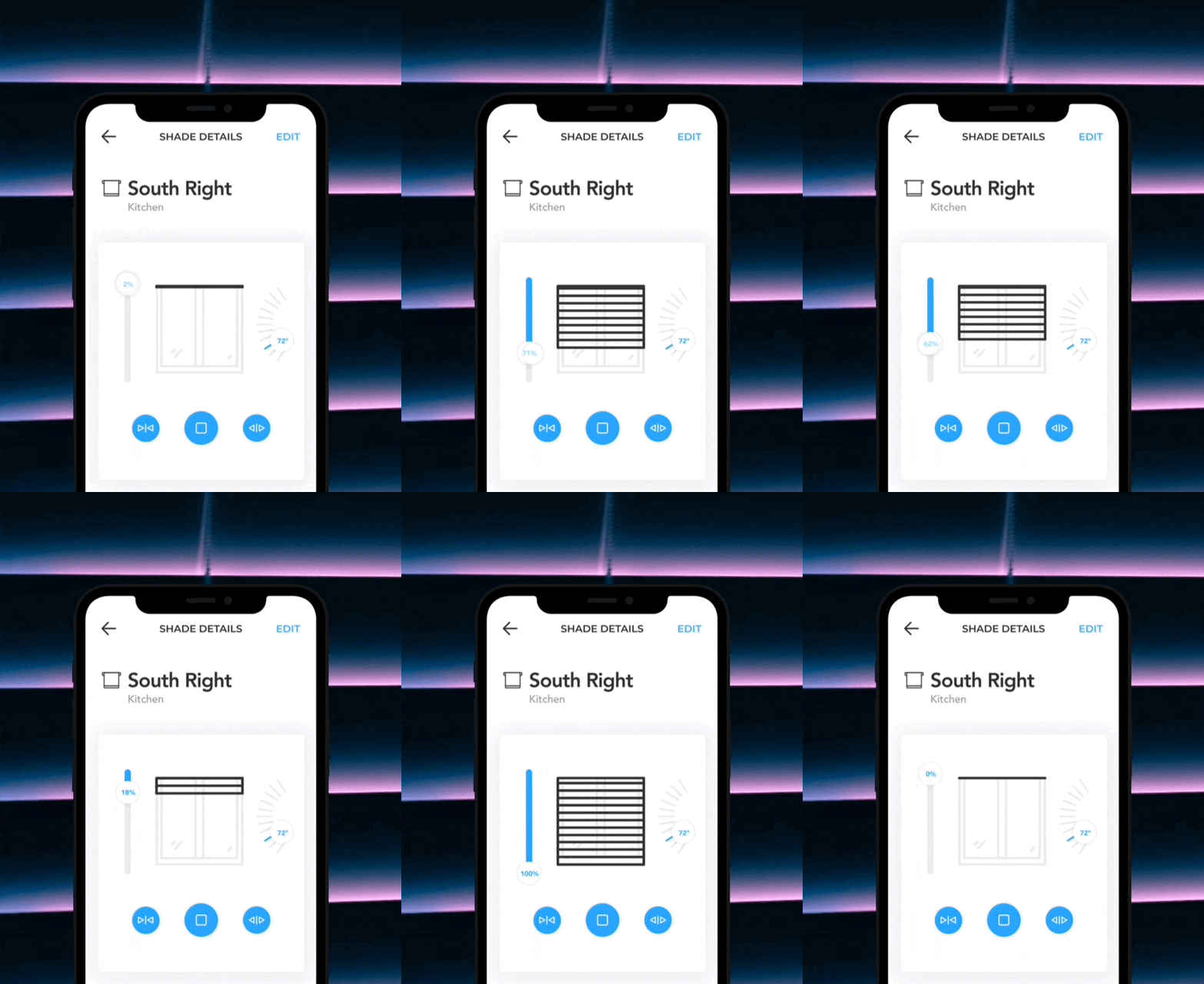
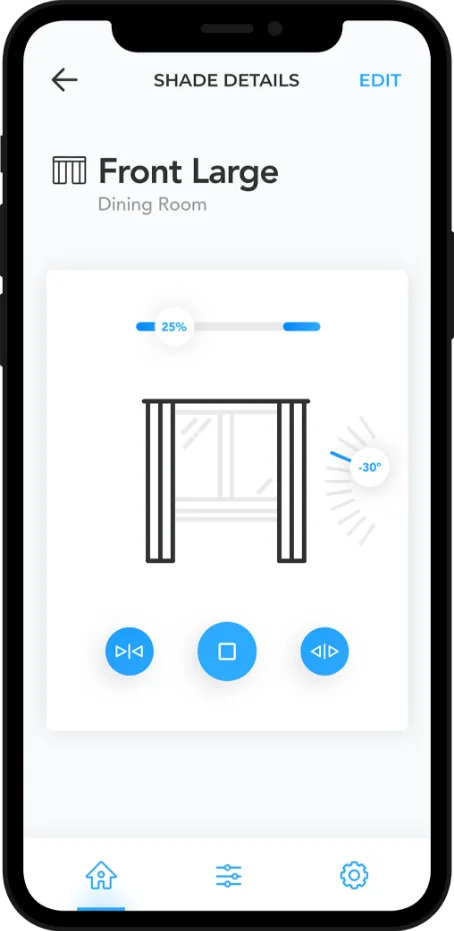
A critical design innovation was the product motion display: as blinds physically move left-to-right or top-to-bottom, the app reflects that movement in real time through animated visual feedback. This created an intuitive connection between the digital interface and the physical product, helping users understand what their commands were doing.
The wireframes were assembled into a clickable prototype that allowed Turnils stakeholders and their hardware partners to experience the complete user journey before any code was written, validating the UX approach across all three personas.

Comprehensive wireframes spanning onboarding, connection, and device management flows
React Native, Ruby on Rails, and IoT cloud integration
Digital Scientists designed a full-stack architecture optimized for cross-platform mobile development and reliable IoT device communication. React Native was selected over native development for cross-platform efficiency, while the IoT integration layer was designed to handle the complexity of communicating through cloud services, bridges, and multiple motor types.

System architecture: App to API to IoT cloud to physical blinds
Mobile App
React Native
API
Ruby on Rails
Database
PostgreSQL
Hosting
Elastic Beanstalk
IoT Platform
Gizwits PaaS
CI / CD
CircleCI + CodePush
Error Tracking
Sentry
Analytics
Amplitude
Key Architecture Risks Identified
Gizwits IoT cloud dependency, third-party platform reliability
Bridge hardware reliability during active firmware development
Custom SDK integration challenges with proprietary motor protocols
A phased roadmap from MVP to full product
Digital Scientists defined a three-phase development roadmap spanning 15 sprints, prioritizing core functionality first and layering in advanced features as the platform matured. The roadmap was designed around a single full-time developer, with an accelerated option using two developers.
MVP Launch
Core functionality for a single-bridge smart shade experience with room and scene management.
- Single bridge support
- CRUD shades, rooms, scenes
- Multi-language support
- Brand-specific barcode onboarding
Smart Home Integration
Voice assistant integration and advanced automation features for power users.
- Google Home & Alexa
- Scheduled routines
- Multi-user accounts
Advanced Platform
Multi-home support and expanded connectivity options for the complete product vision.
- Multi-home management
- BLE motor support
- Location-based automation
A polished, brandable smart home experience
The visual design brought the wireframes to life with a clean, modern interface that adapts to each brand's identity. The Motivia-branded version for Smith and Noble demonstrated how the white-label system worked in practice, same app, completely different brand experience.
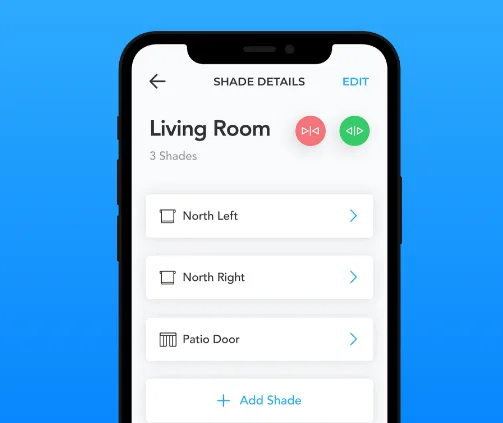
Room management and individual shade controls
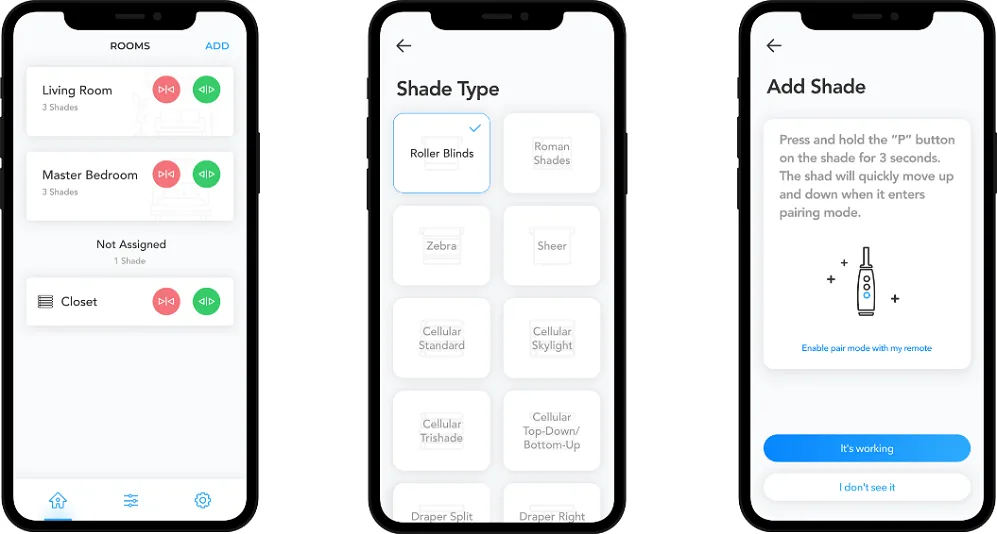
Scene management and brand customization
Product Motion Display
A key design innovation was the in-app motion display. Digital Scientists worked closely with the hardware team to understand each motor type's movement capabilities, pitch, tilt, up/down, and stop controls. As the physical blinds move, the app reflects that movement in real time through animated visual feedback.
This created an intuitive connection between the digital interface and the physical product, giving users confidence that their commands were being executed correctly, critical for an IoT product where the controlled device may be in another room.
A complete product blueprint ready for development
Digital Scientists delivered a comprehensive MVP Product Blueprint that gave Turnils everything they needed to move from concept to development. The blueprint addressed the core multi-brand challenge through an innovative barcode-based onboarding system, provided a production-ready technical architecture, and defined a clear development roadmap with phased feature delivery.
White-label solution, barcode scanning during onboarding customizes the entire app for each brand without violating App Store policies
Cross-platform architecture, React Native app with Ruby on Rails API and IoT cloud integration designed for Android and iOS
Product motion display, in-app animations reflect real-time physical shade movement for intuitive user feedback
User-validated design, three personas and clickable prototype validated the UX approach with real stakeholder feedback
Multi-language support, English and Spanish from day one, with architecture supporting additional languages
What Digital Scientists delivered
The MVP Product Blueprint encompassed research, design, architecture, and strategic planning, everything Turnils needed to confidently move into development.
Clickable Prototype
Interactive prototype covering all four MVP workflows, validated with stakeholders and hardware partners before development.
Brandable App Design
UX and visual design for a white-label app that adapts to each brand through barcode-based onboarding customization.
Solution Architecture
Full-stack technical architecture with React Native, Ruby on Rails, PostgreSQL, and IoT cloud integration specifications.
Competitive Analysis
Market review of leading smart blind and IoT applications identifying design patterns, feature expectations, and competitive positioning opportunities.
Persona & Journey Maps
Three user personas with detailed journey maps covering end users, professional installers, and brand partner experiences.
Product Roadmap
Three-phase development roadmap with sprint-level planning, resource estimates, and feature sequencing from MVP to full product.
Ready to blueprint your IoT product?
Digital Scientists helps companies design and architect connected product experiences, from smart home IoT to healthcare devices. Let's discuss your next product blueprint.